

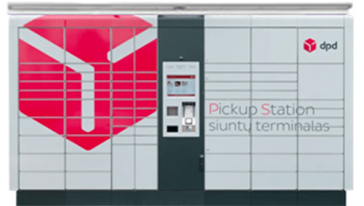
How to send a parcel via DPD parcel locker?
A simple and clear step-by-step guide for convenient shipping via DPD Pickup self-service terminals with Couriers for Less.
Register your parcel online
Fill in all required details on the Couriers for Less website. To receive the label at the terminal, be sure to select during ordering:
Pack your parcel
Safely prepare your parcel for transport. If you chose to print the label at the terminal, you only need the parcel code you received (you will find it in an SMS or email).
Go to the DPD parcel locker
On the parcel locker screen, select the main menu option "Send parcel".
Print the label
Enter the parcel number you received. The DPD parcel locker will automatically print the label. Stick it firmly onto the top of the package so that the barcode is clearly visible.
Place the parcel in the locker
Scan the attached label with the scanner located below the screen. A locker door of the appropriate size will open. Place the parcel inside, close the door, and confirm the shipment on the screen.
Useful information about DPD Pickup
The DPD Pickup network is one of the largest in Europe, so once you drop off your parcel at a locker, you can easily send it not only to another local city, but also to many countries abroad. Services booked via Couriers for Less ensure that the entire process runs smoothly at the most competitive prices on the market.