

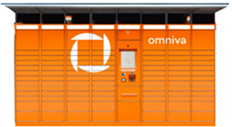
How to pick up a parcel from an Omniva parcel locker?
A simple and clear step-by-step guide for convenient parcel pickup through Omniva self-service terminals with Couriers for Less.
Receive the PIN code
Once your parcel is delivered to the parcel locker, Omniva will send you an SMS message with a 6-digit door code.
Start pickup
On the parcel locker's touchscreen, select your preferred language and press the main button "Pick up parcel".
Enter the code
Enter the 6-digit code received via SMS on the screen keyboard and confirm.
Take your parcel
The door will open automatically. Take your parcel and make sure to close the door. Choose on the screen whether you want a printed receipt.
Good to know about parcel storage
Omniva stores parcels in lockers for 7 calendar days. Since the Omniva network is the largest in the Baltics, you can pick up your parcel close to home or work at any time of day. Using Couriers for Less, you can not only send cheaper, but also conveniently track your shipment's journey.